Hi all,
I uploaded a project built by bolt.diy to bolt.diy to work on it. After completion, i tried to deploy it so i asked bolt to save the project and it ran the command “npm run build” and it showed the execution was completed successfully, however I can’t find the project folder. I searched for folder name " Build",
dist … nothing there! What am I missing??
can you show / paste the console output please
You mean this one? :
C:\Bolt DIY\New installation\bolt.diy>pnpm run dev
bolt@0.0.5 dev C:\Bolt DIY\New installation\bolt.diy
node pre-start.cjs && remix vite:dev
★═══════════════════════════════════════★
B O L T . D I Y
 Welcome
★═══════════════════════════════════════★
 Current Version Tag: v"0.0.5"
Current Commit Version: “d62e211”
Please wait until the URL appears here
★═══════════════════════════════════════★
warn Data fetching is changing to a single fetch in React Router v7
┃ You can use the v3_singleFetch future flag to opt-in early.
┃ → Future Flags (v2.13.1) | Remix
┗
➜ Local: http://localhost:5173/
➜ Network: use --host to expose
➜ press h + enter to show help
ok this looks good so far.
Can you please clone the repo from git again into another folder but then install it with
npm install && npm run dev
instead of PNPM. We had some problems with macOS users, where PNPM was not working at all. maybe it at least runs for you but you get then these strange error. dont know 
I am on windows 10 not mac. I’ll try what you said. So, should the project build progress be shown in the console as well? it didn’t show up. This is what I got from Bolt diy chat:
" * Run command
npm run build
I’ve executed npm run build again. This ensures that you have the latest production build in the dist folder, ready for deployment."
This so called dist folder, I can’t find it!
post the terminal output where you run npm run build pls.
for windows pnpm run dev should be fine. sry mixed it up with another topic. to much topics these days
Nevermind too much topics and too much code too since i am no coder!
Here it is:
~/project
❯

~/project
❯ npm install && npm run dev

added 279 packages in 10s

65 packages are looking for funding
  run `npm fund` for details

> calculator@1.0.0 dev
> vite


  VITE v5.4.8  ready in 17285 ms

  ➜  Local:   http://localhost:5173/
  ➜  Network: use --host to expose
  ➜  press h + enter to show help
^C

~/project 2m 13s
❯ npm run build

> calculator@1.0.0 build
> vite build

vite v5.4.8 building for production...
✓ 1483 modules transformed.
dist/index.html                   0.46 kB │ gzip:  0.30 kB
dist/assets/index-BtwQnQci.css   13.41 kB │ gzip:  3.35 kB
dist/assets/index-C6UNaWcE.js   178.67 kB │ gzip: 56.54 kB
✓ built in 24.52s

~/project 42s
❯

~/project
❯

~/project
❯
ah wait. I think you mixed something up there.
The app you build is within the container, so you would see it inside bolt in browser in the code window. There is a dist folder.
If you want this dist folder, you need to download the project:
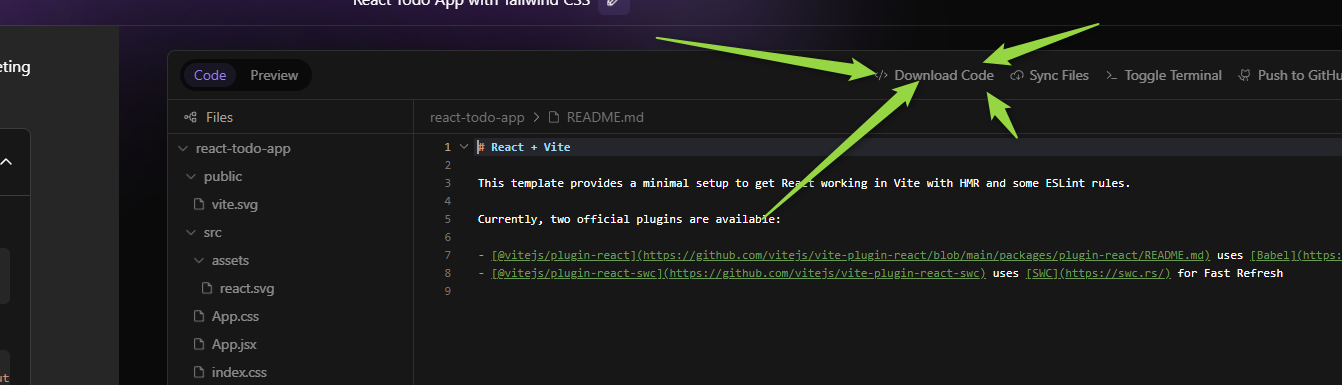
I guess I did! So, it won’t save it locally inside Bolt installation folder…
Thanks for your time my friend.
correct, thats incapsulated within the container. you need to either download it or push it to git and use from there. Also did a video on how to deploy it on github pages (see profile)
1 Like
Gotta see that video. Thnx.
1 Like
Try this…
2 Likes